About this exam
UiPath-SAIAv1 is the UiPath exam UiPath Specialized AI Associate Exam.
Paid practice material for this exam is not available yet, but you can try its free sample questions.
- Exam code
- UiPath-SAIAv1
- Vendor
- UiPath
- Practice questions
- Not available yet
- Free sample questions
- 5
- Question bank last updated
- Not available yet
Try 2 sample questions
Taken from the free sample set for UiPath-SAIAv1.
Question 1
What is OCR (Optical Character Recognition)?
- AOption A:
OCR is a document classification method.
- BOption B:
OCR is a method that reads text from images, recognizing each character and its position.
- COption C:
OCR is a platform that enables you to do text-to-speech and speech-to-text.
- DOption D:
OCR is a tool used to interpret information extracted from documents.
Show answer and explanation
Correct answer: B
Optical Character Recognition (OCR) is a method used to convert different types of documents (PDFs,
scanned paper documents, images) into editable and searchable data by recognizing characters and
their positions.
OCR is vital in Document Understanding to digitize unstructured data from images and scanned docs.
UiPath Documentation Reference:
OCR Engines in Document Understanding
Question 2
A developer configured the UI Automation Project Settings and the Properties of a Click activity as
shown in the following exhibits:
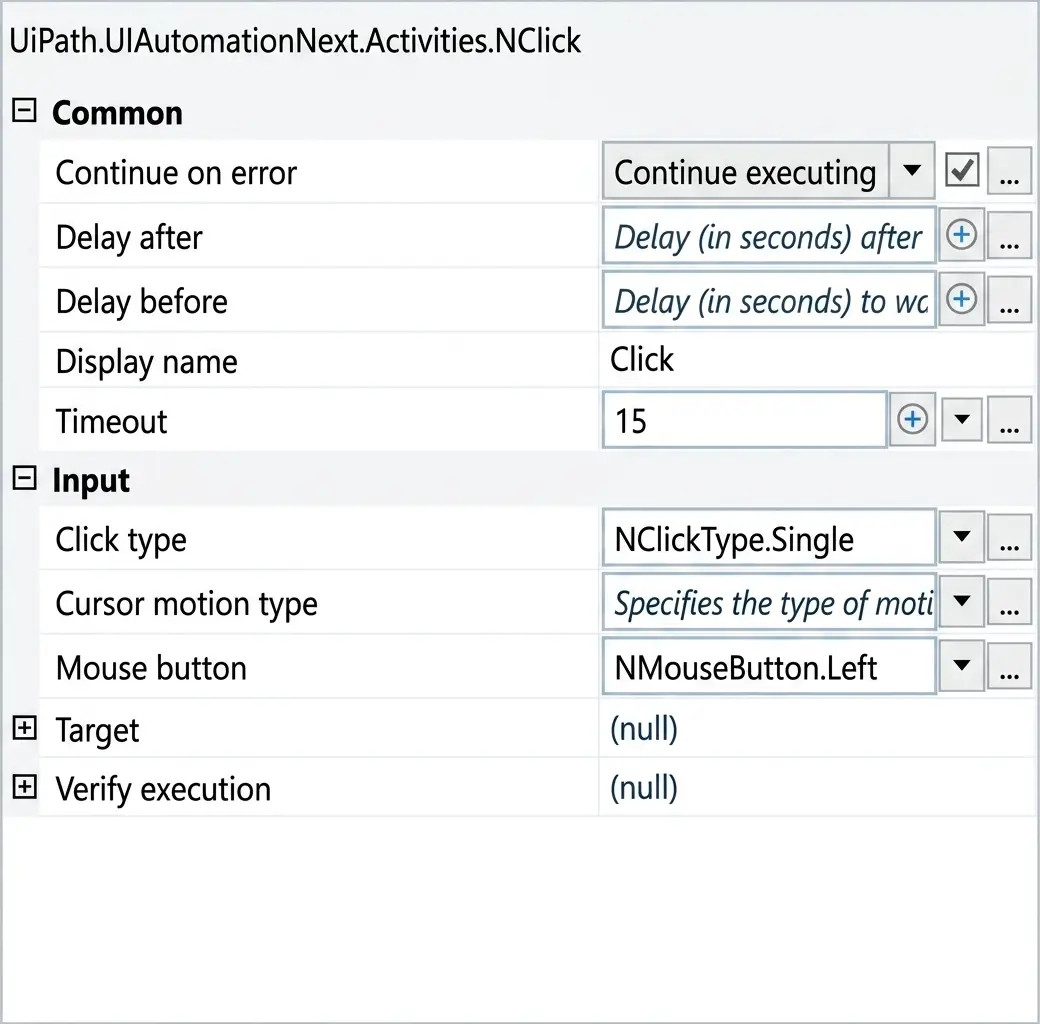
If the target element is not found during execution in Run mode, how long will it take until an error is
thrown (based on default project settings)?
- AOption A:
0.15
- BOption B:
0.2
- COption C:
15
- DOption D:
30
Show answer and explanation
Correct answer: C
Comprehensive and Detailed Explanation From Exact Extract:
In UiPath, when executing an activity such as Click, the timeout behavior is determined as follows:
If the Timeout property in the activity is set, that value is used.
If the Timeout is left blank, the system uses the default from Project Settings under UI Automation
Modern → Timeout.
In this case (based on the second image):
The Click activity explicitly has Timeout set to 15 seconds.
Therefore, this activity will override the project-level default timeout (which is 30 seconds as seen in
the first image).
Rule Applied:
Activity Timeout > Project Settings Timeout (if defined)
Hence, if the target element is not found, UiPath will wait for 15 seconds, as specified in the activity's
Timeout field, before throwing an error.
UiPath Documentation Reference:
TimeoutMS Property – UiPath Docs
See all 5 free sample questions